
When businesses choose new technology, one big question always comes up: cloud software vs on-premise systems. The decision is not only about features or performance. It is mainly about cost—both today and over time.
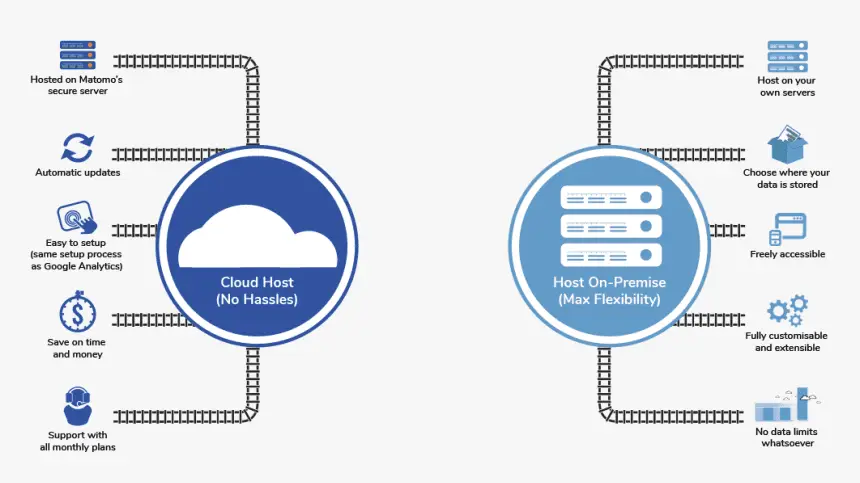
Cloud software runs on remote servers and is accessed online. On-premise systems run on hardware owned and managed by the business. Each option has clear cost differences, hidden expenses, and long-term financial impact.
Many growing businesses assume cloud software is always cheaper. Others believe on-premise systems are more secure and stable. The truth is more balanced. This article explains the full cost breakdown of cloud software vs on-premise systems in simple terms, so businesses can make smarter decisions without surprises.
Read also: The Bright Future of Artificial Intelligence in Our Everyday Lives
Why Businesses Compare Cloud Software and On-Premise Systems
Rising IT Costs Force Smarter Decisions
Technology costs keep rising. Hardware, security, staff, and maintenance all add up. Businesses must understand where money is spent and why.
Comparing cloud and on-premise systems helps leaders avoid overspending and plan budgets better.
Different Growth Needs Require Different Systems
A small team has different needs than a large enterprise. What works at one stage may fail at another.
Cost structure matters more as businesses grow and scale.
Long-Term Stability vs Short-Term Savings
Some systems look cheap at first but cost more later. Others feel expensive upfront but stay stable over time.
Understanding this difference is critical for long-term planning.
What Cloud Software Really Costs
Subscription and Usage Fees
Cloud software usually follows a subscription model. Businesses pay monthly or yearly fees based on users, storage, or usage.
Platforms like Amazon Web Services, Microsoft Azure, and Google Cloud charge based on how much is used.
This makes costs predictable but ongoing.
Infrastructure Without Hardware Investment
Cloud systems remove the need to buy servers, storage devices, and networking hardware. There is no upfront hardware cost.
This lowers the entry barrier for small and growing businesses.
Scaling Costs as Usage Grows
Scaling is easy in the cloud. But scaling is not free.
As more users, data, and processing power are added, monthly bills increase. Over time, this can exceed initial expectations.
Hidden Costs of Cloud Software
Long-Term Subscription Accumulation
Cloud fees never stop. Over five or ten years, subscription costs can exceed the price of owning hardware.
This long-term cost is often underestimated.
Data Transfer and Storage Fees
Moving data in and out of the cloud may incur extra charges. Large data usage can raise costs quickly.
Businesses with heavy data workloads must watch this closely.
Vendor Dependency and Switching Costs
Once systems are built in the cloud, moving away can be expensive. Migration costs, retraining, and downtime add financial risk.
This creates vendor dependency over time.
What On-Premise Systems Really Cost
Upfront Hardware and Software Investment
On-premise systems require servers, networking equipment, and licensed software. These costs are paid upfront.
This makes on-premise systems expensive at the start.
Ongoing Maintenance and Repairs
Hardware fails. Systems need updates. Maintenance costs continue year after year.
These costs are predictable but unavoidable.
Dedicated IT Staff Expenses
On-premise systems require skilled IT staff. Salaries, training, and support add significant cost.
This is often the largest long-term expense.
Hidden Costs of On-Premise Systems
Upgrade and Replacement Cycles
Hardware becomes outdated. Systems must be replaced every few years.
Upgrade cycles create sudden spikes in spending.
Downtime and Business Disruption
When systems fail, businesses lose productivity. Downtime costs money even if it does not appear on invoices.
Cloud systems often reduce this risk.
Security and Compliance Costs
On-premise systems place security responsibility on the business. Firewalls, backups, and compliance tools increase expenses.
Cloud Software vs On-Premise: Cost Comparison by Category
Initial Setup Costs
Cloud software has low setup costs. On-premise systems require high upfront investment.
For startups and small teams, cloud often wins here.
Ongoing Operational Costs
Cloud costs are ongoing and variable. On-premise costs are steady but include staffing and maintenance.
Which is cheaper depends on scale and usage.
Scaling and Growth Costs
Cloud systems scale quickly but charge for growth. On-premise systems scale slowly but may be cheaper at large, stable scale.
Growth speed matters in this comparison.
Cost Impact on Different Business Sizes
Small Businesses and Startups
Small teams benefit from cloud software. Low upfront costs and minimal IT needs make it attractive.
On-premise systems are usually too expensive early on.
Mid-Sized Growing Businesses
Mid-sized companies face trade-offs. Cloud offers flexibility, but rising subscription costs become noticeable.
Hybrid approaches are common at this stage.
Large Enterprises and Stable Operations
Large organizations with stable workloads may find on-premise systems more cost-effective long term.
They can spread hardware costs over many years.
Security, Reliability, and Cost Trade-Offs
Cloud Security as a Shared Cost
Cloud providers invest heavily in security. This cost is shared across many customers.
This reduces individual security spending.
On-Premise Security as a Direct Expense
On-premise security costs fall entirely on the business. Firewalls, monitoring, and compliance add to budgets.
Security spending increases as threats grow.
Reliability and Disaster Recovery Costs
Cloud platforms include built-in redundancy. On-premise systems require separate disaster recovery planning.
Disaster recovery costs are often overlooked in on-premise budgets.
Choosing the Right System Based on Cost Strategy
When Cloud Software Is More Cost-Effective
Cloud works best when:
- Growth is unpredictable
- Teams are remote
- Capital budgets are limited
- Speed matters more than ownership
When On-Premise Systems Make Financial Sense
On-premise works better when:
- Workloads are stable
- Data volume is high
- Long-term ownership is preferred
- Internal IT teams already exist
Avoiding Cost Surprises With Proper Planning
The best decisions come from realistic projections. Businesses should calculate costs over 3–5 years, not just the first year.
Short-term savings should not hide long-term expense.
Real-World Cost Analysis: Cloud Software vs On-Premise Systems
Example #1 : Business Scenario
A mid-sized professional services business has:
- 40 employees
- 25 daily system users
- File storage, email, CRM, and internal apps
- Moderate growth planned over the next 3–5 years
The business must choose between cloud software and an on-premise system.
Option 1: Cloud Software Cost Breakdown (3-Year View)
Upfront Costs
- Hardware: $0
- Setup & migration: $5,000
- Training: $2,000
Initial cost: ~$7,000
Ongoing Monthly Costs
- Cloud subscriptions (apps, storage, users): $2,200/month
- Extra storage & usage fees: $300/month
Monthly total: ~$2,500
Yearly total: ~$30,000
3-Year Cloud Cost
- Yearly cost × 3 = $90,000
- Plus setup = $97,000
Pros
- No servers to manage
- Easy scaling
- Built-in backups and uptime
Cons
- Costs increase as users grow
- Monthly bills never stop
Option 2: On-Premise System Cost Breakdown (3-Year View)
Upfront Costs
- Servers & networking: $40,000
- Software licenses: $15,000
- Setup & configuration: $10,000
Initial cost: ~$65,000
Ongoing Yearly Costs
- IT support & maintenance: $12,000/year
- Power, cooling, backups: $3,000/year
Yearly total: ~$15,000
3-Year On-Premise Cost
- Maintenance × 3 = $45,000
- Plus setup = $110,000
Pros
- Predictable long-term costs
- Full data control
- No usage-based billing
Cons
- High upfront spend
- Slower scaling
- Hardware replacement risk
Side-by-Side Cost Summary (3 Years)
| System Type | Total Cost (3 Years) |
|---|---|
| Cloud Software | ~$97,000 |
| On-Premise | ~$110,000 |
What Actually Happened (Real-World Insight)
The business chose cloud software because:
- Lower upfront risk
- Faster deployment
- No in-house IT expansion
After 18 months, they noticed:
- Monthly costs rising as users increased
- Storage fees growing faster than expected
By year 3:
- Cloud was still cheaper overall
- But the gap was shrinking
They planned a hybrid model for the future:
- Core apps in the cloud
- Large file storage moved on-premise
Key Takeaways From the Real-World Example
- Cloud is cheaper early and mid-term
- On-premise becomes competitive at stable scale
- Usage growth is the hidden cloud cost
- Hardware replacement is the hidden on-premise cost
- Cost decisions should be based on 3–5 year projections, not year one
Example 2: Growing Marketing Agency (Cloud Looks Cheap—Until Storage Explodes)
Business Profile
- 35 employees
- Designers and video editors
- Large files (videos, graphics, backups)
- Remote work
Cloud Cost Breakdown
Year 1
- Monthly cost: $1,800
- Storage fees: $300/month
- Total yearly: ~$25,200
Year 3
- Monthly cost grows to $3,500
- Storage now $1,200/month
- Yearly cost: ~$56,400
3-year total: ~$115,000
On-Premise + Hybrid Adjustment
- Added local storage server in Year 2
- Cost: $30,000
- Cloud storage reduced by 45%
New 3-year total: ~$92,000
Decision & Outcome
They moved to a hybrid model.
Why Full Cloud Failed
- Storage costs scaled faster than users
- Monthly bills became unpredictable
Key lesson:
Cloud storage is one of the biggest hidden long-term costs.
Example 3: Professional Accounting Firm (On-Premise Wins Over Time)
Business Profile
- 55 employees
- Stable workload year-round
- Sensitive client data
- Low employee turnover
On-Premise Cost Breakdown (5 Years)
- Servers & hardware: $85,000
- Software licenses: $20,000
- IT staff & maintenance: $18,000/year
- 5-year total: ~$195,000
Cloud Cost Breakdown (5 Years)
- Monthly cost: $3,800
- Compliance & backup add-ons: $700/month
- Yearly cost: ~$54,000
- 5-year total: ~$270,000
Decision & Outcome
They stayed on-premise.
Why It Worked
- Predictable workload
- Hardware fully paid off by Year 3
- Stable long-term cost
Key lesson:
Stable businesses often save more by owning infrastructure.
Example 4: Healthcare Clinic Group (Compliance Changes the Math)
Business Profile
- 3 clinic locations
- 70 users
- Patient records, imaging, scheduling
- Strict data rules
Full Cloud Cost Issues
- Compliance add-ons increase pricing
- High storage cost for medical images
- Audit and access fees
3-year cloud total: ~$175,000
Hybrid Cost Breakdown
- Patient data stored on-premise
- Scheduling, email, collaboration in cloud
- Servers & compliance tools: $60,000
- Cloud tools: $22,000/year
3-year hybrid total: ~$135,000
Decision & Outcome
They chose hybrid.
Why Hybrid Won
- Lower compliance cost
- Better control of sensitive data
- Cloud flexibility where allowed
Key lesson:
Regulated industries often pay a premium for full cloud.
Example 5: Manufacturing Company (Cloud Fails at Scale)
Business Profile
- 140 employees
- Factory systems, internal apps
- Little remote work
- Heavy system usage
Cloud Cost Breakdown (7 Years)
- Usage-based billing grows yearly
- Network latency issues
- 7-year total: ~$420,000
On-Premise Cost Breakdown (7 Years)
- Initial setup: $160,000
- IT staff & maintenance: $22,000/year
- 7-year total: ~$314,000
Decision & Outcome
They stayed on-premise.
Why Cloud Failed
- Continuous usage = continuous billing
- Systems never scaled down
Key lesson:
Cloud loses its cost advantage at stable, high usage.
Cross-Example Cost Patterns (Very Important)
| Situation | Best Choice |
|---|---|
| Small teams | Cloud |
| Fast growth | Cloud → Hybrid |
| Heavy storage | Hybrid |
| Stable workloads | On-Premise |
| Compliance-heavy | Hybrid |
| Long-term cost focus | On-Premise |
The Most Common Cost Mistakes Businesses Make
- Comparing Year 1 only, not 3–5 years
- Ignoring storage growth
- Underestimating IT staff cost (on-premise)
- Underestimating usage fees (cloud)
- Assuming “cloud = always cheaper”
Final Reality Check
- Cloud is operationally easy, not always cheap
- On-premise is capital heavy, but stabilizes over time
- Hybrid is often the real-world compromise
The cheapest system is the one that matches how your business actually grows.
Conclusion: Cloud Software vs On-Premise Systems Is a Cost Strategy Decision
The debate between cloud software vs on-premise systems is not about which is better overall. It is about cost structure, growth plans, and risk tolerance.
Cloud software lowers entry costs and supports flexibility, but long-term subscriptions can add up. On-premise systems require heavy upfront investment, but costs stabilize over time.
There is no universal winner. The right choice depends on business size, growth speed, data needs, and budget strategy.
Understanding the full cost breakdown helps businesses avoid surprises, control spending, and choose systems that support long-term stability—not just short-term convenience.
FAQS:
Is cloud software always cheaper than on-premise systems?
No. Cloud software is usually cheaper at the start because there is no hardware to buy. Over time, monthly fees, storage costs, and usage charges can add up. For stable, long-term workloads, on-premise systems may cost less after several years.
Cloud software has low upfront costs. Businesses pay monthly instead of buying servers and licenses. This makes it easier to start, especially for small teams. The higher costs usually appear later as usage grows.
The most common hidden costs are:
Growing storage fees
Data transfer charges
Higher user-based pricing
Migration costs if switching providers
These costs often increase quietly over time.
On-premise systems often hide costs like:
Hardware replacement every few years
IT staff or outsourced support
Downtime during failures
Security and compliance tools
These costs appear gradually, not upfront.